Latest Tecnology News and Reviews

Tampilkan postingan dengan label Lenovo IdeaPad. Tampilkan semua postingan

Lenovo IdeaPad S10-3 Black, Small Netbook Convincing Quality_review,specs and price.


Lenovo IdeaPad S10-3 now comes with black color, new design that is powered by an Intel Atom (TM) CPU N470@1.83GHz, netbook is not much power consumption so batteries last longer. By using 6 cell Li-ion battery, Lenovo party claims that under normal circumstances this Netbook can last for 6 hours without having to do the charger.

Intel Atom (TM) CPU N470 in this Netbook is one of the strengths of the Lenovo S10 IdePad N470-3 because the processor is a processor output of Intel's latest N series which would have better performance than the previous series. Given that most of the Netbooks on the market today still use the previous series, this Netbook can be a new choice to accompany work activities.
For business graphics, the Netbook is powered by Intel Graphic Media Accelerator 3150 with 256MB memory. The amount of VGA memory is what makes the picture quality of this product is so convincing. Larger than some Netbook class.

With Windows 7 Starter as the default operating system, this Netbook can direct you to use without having to install the operating system or hire the services of third parties to install. One weakness of the windows 7 starter is not able to change the background / wallpaper windows 7 starter. Because Microsoft has not included the application used to change the wallpaper. But it's not a problem because with this few tips you can change the wallpaper windows 7 starter in accordance with your wishes.

In addition to Windows 7 Starter, this notebook is also equipped with software Microsoft Office 2007 that all would know its function. Although this is Microsoft Office 2007 trial for 60 days, you can try to do many things with this laptop. To upgrade to the Ultimate version, you can contact Microsoft or its representative office in your town or upgrade online via the Microsoft website.

More than that, the notebook is also included some software that will help you on your activity. One is Adobe reader 9, Adobe made ​​software that is used to read PDF files. There is also software built from Lenovo that you can use when the system is experiencing problems Netbook. His name OneKey Recovery Software. You just run the application and follow the prompts, then the problem of the system on a netbook you will be right again.

For security issues, the Lenovo IdeaPad has also included the McAfee Security Center that allows you to protect your netbook from outside interference such as viruses. This software also serves to protect from disorders such as spyware, trojans, worms and other distractions when you are surfing the internet.

Other standard features such as netbooks, Lenovo IdeaPad Black S0-3 is equipped with a wi-fi which of course we all already know the benefits. Wireless can be utilized when we were in a cafe, mall, airport or in other places that provide the hotspot service. It would also be useful when you take him to the office in which to use as a media hotspot network connection.

If you require a connection through a cable network, in this netbook also has integrated a LAN port. You only need to set up a network cable with RJ45 connectors to connect this netbook with HUB / Switch to communicate with other devices.

For those who like to experiment with the USB device, the netbook is also included three USB ports. Two ports on the right side, and one USB port in addition to the left. USB can be utilized for various things such as transfer of data to the flash disk, printer connections, external modems and other media that use USB as the connecting medium.

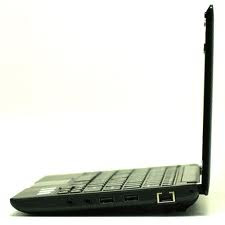
Dolby stereo speakers will always accompany you when playing music, play video or audio recording because in this netbook has an integrated internal microphone. Two audio jacks on the right side can be utilized to more experimenting with the audio of this netbook. You can use an external headset or other audio device with this audio jack.

Integration Web camera on the top of the LCD screen you can use to take pictures, record video or just a "narcissistic" in front of the netbook. The quality of images produced by the web camera is also fairly good. Unfortunately, to use it you must use third-party software camera because the package does not include software for the camera.

By combining the functions of wireless / LAN for internet connection, audio for voice communications as a web camera plus video media, you can use this netbook for video confrence with coworkers, friends or your family. Take advantage of free amenities such as yahoo messenger, skype, windows live messenger as the medium. Only need to register and install a website into a netbook, you'll feel closer to your friends via video conference.

In addition, the Lenovo IdeaPad S10-3 is equipped with a card reader tlah. Memory Supported by the card reader includes SD card, MMC, MS and Mspro. To try it, unscrew the card reader on the left side of the notebook and insert the memory into it.
Detailed specification of Lenovo IdeaPad S10-3netbook:
  • Intel Atom (TM) CPU N470@1.83GHz
  • RAM DDR2 1GB 667MHz
  • Hardisk Drive 250GB 5400 rpm SATA
  • Intel GMA 3150 graphics with a maximum resolution of 1024 × 600 pixels
  • Integrated Bluetooth Device
  • Integrated LAN Card for RJ45 Connector
  • Integrated Wireless Network
  • Integrated Web Camera 1.3 megapixels
  • Stereo speakers with Dolby headphone
  • 3 USB 2.0 ports (one on the left side and two on the right side)
  • Operating System Microsoft Windows 7 Starter
  • Microsoft Office 2007 (Trial 60 days)
  • 6 cell Li-ion batt (lasting up to 6 hours)
  • Multi-touch Touchpad Enabled
Conclusion of the tests we did, it looks like Lenovo IdeaPad S10-3 is not intended to do heavy work such as editing video and photos. This product is intended more for those of you who have a high mobility given the battery life that can be used for 6 hours without the charger.
Additional applications such as Microsoft Office 2007 will help you in your activity. Additional applications are like adobe reader can also make you more comfortable when reading PDF files that you have. It also added some of the lenovo recovery applications that will greatly help you when the netbook is having problems with systemnya. Just run a few steps with this software the netbook will be back to normal.

Lenovo IdeaPad Y460 with Face Scanner Less Than 10 Seconds, specs and review

Lenovo IdeaPad line of notebook again presents a segment aimed at multimedia users. This segment is a segment of users who need a product with good performance on high-definition resolution. One of the products presented is the IdeaPad Y460. As is known, the product line from Lenovo Y series is a widescreen laptop equipped to meet the needs of multimedia and gaming for users.

Design and Specifications Lenovo IdeaPad uses LED-backlit glossy screen 14 inch with 16:9 aspect ratio. 1.3 megapixel video camera, and microphone and speaker output is useful for those who want to do a teleconference. As for high-definition video lovers are pampered with the JBL stereo speakers that are available. Lenovo IdeaPad Y460 uses the latest Intel Core processors for multimedia i5 can run well.

Here's the Lenovo IdeaPad Y460 technical specifications That We tried this time:
  • Processor: Core i5-520M, 3MB cache, 2.4 GHz
  • Chipset: Mobile Intel Express HM55
  • Memory: 4GB DDR3
  • VGA: Intel GMA 4500MHD, AMD's Radeon HD 5650
  • Screen: 14 inches Glossy, LED backlit display up to 1366x768
  • Hard Drive: 320GB, 2.5 "SATA 5400rpm
  • Sound / speakers: Realtek ALC272/JBL Stereo Speakers
  • Optical Drive: 8x Multi DVD
  • Battery: 6 cell, 5200 mAh
  • Connectivity: Wireless N WiFi, Gigabit LAN, Bluetooth 2.1
  • External ports: USB, eSATA, VGA, HDMI, Audio, SPDIF Out, Express Card, 6 in 1 card reader
  • Dimensions: 34 x 23.5 x 2.06 to 3.3 cm
  • Weight: 2.2 Kg (with 6 cell battery)
  • Operating system: Windows 7 Home Premium
  • Warranty: 1 year

Features full multimedia notebook itself does not mean this is inefficient if used for traveling. In order to save battery usage, Lenovo provides a switchable graphics. With switchable graphics, users can switch between using the integrated graphics Intel Graphics Media Accelerator 4500 MHD on the go or Radeon HD 5000 series are embedded when using a notebook near the source of the grid.

Graphic transition itself can be done directly without the need to restart, but all applications currently running on the operating system shut down first.


Features:
To speed up loading the operating system, Lenovo is implementing what is known as Enhanced Experience RapidDrive technology. Optimization method of storage on my hard drive is claimed to be able to generate 66.6 percent faster performance when starting the program and mengopikan file.

At the top of the keyboard, Lenovo has also put a touch-sensitive slide bar for easy navigation that use the various applications on the computer. On the left side of the notebook, available VGA port, HDMI, Audio, LAN, and USB. On the right, there is an eSATA port and one USB port. Interestingly, an available USB port are designed to be clamped tightly USB device is plugged in there.

On screen, there is a sensor called Ambient Light Sensor. The point, the screen can adjust the display brightness level automatically, based on the distance the user with the screen. For security, as usual, VeriFace facilities provided. That is, users do not need to type a password when logging into Windows. Simply show my face, then depending on light conditions or the position of the face, the camera is also only takes less than 10 seconds to perform a scan.

As a bundle, inside the Windows 7 Home Premium is included, Lenovo install software such as Media Show, Adobe Reader, Lenovo SlideNav, CyberLink YouCam, Lenovo ReadyComm, CyberLink Power2Go, Lenovo DirectShare, Lenovo OneKey Recovery, Windows Live Essentials, Lenovo Energy Management . Microsoft Office 2007 (60 days trial) and McAfee VirusScan Plus 2009 (trial 60 days) also available.

Performance:
When we try to play 3D games with 1366x768 resolution, the notebook can rotate smoothly without a hitch. 6 cell battery that is attached to supply power up to 1 hour 15 minutes.

When used for watching high definition videos, the battery can last up to 1 hour 30 minutes. As if it is used for work such as browsing the Internet, run Office applications, email, and instant messenger via a Wi-Fi multi-tasking, the battery can supply power for 1 hour and 40 minutes.

Unfortunately, when the high-definition multimedia mode, the temperature issued by the processor and graphics chip is relatively high. However, heat can be channeled either through the vents that are available.

If the energy saving mode, using Intel's integrated graphics, battery takes about 2 hours and 30 minutes to fully charge is capable of supplying power to about 3 hours 30 minutes. Depending on the application and what work is done with a notebook.

In Indonesia, the IdeaPad Y460 is available through Lenovo's distribution channels at a price range starting from 900 dollars to i3 version and start from 1050 dollars for i5 version are used depending on specs. The 1-year warranty is provided by the manufacturer to the owner of this notebook.

Lenovo Ideapad S9 dan S10 Netbook review and price

Country Manager, Transactional Business Lenovo Indonesia Irene Santosa said the two series that uses Intel's Atom N270 processor that is currently being shipped from China. Although the mini, hard disk capacity there are two brand-new product is up to 120 and 160 gigabytes, with up to 1 gigabyte of memory. This netbook runs Windows XP operating system. "There is Linux, but not marketed in Indonesia," said Irene in a launch event in Plaza EX, Jakarta, on Monday. IdeaPad S9 and S10 have the same dimensions, ie 9.83 x 7:23 x 1:08 millimeters. The difference, S9 is a 8.9 inch screen, and 10.2 inches on the S10.

IdeaPad S9 and S10 has a weight of less than 1 kilogram, only 0.9 kilograms, and 2.54 inches thick. Different from the netbook in general that use 1.8-inch hard disk, hard disk Lenovo netbooks its size of 2.5 inches. "This hard disk is generally the standard used laptops," said Country General Manager Lenovo Indonesia Sandy Lumy. Both of these netbooks will have a better performance due to 2.5-inch hard disk has a faster performance.


IdeaPad S9 and S10 is very different from most other netbooks use solid state storage of material disk (SSD), Lenovo chose the hard disk because learning from the experience of competitors. "Wear SSD capacity is expensive and not great," said Irene.

America is one example of the leading manufacturers of netbooks, arrival unfortunate because many of their products returned by consumers. "Consumers are not happy with a small storage capacity. They wanted a large capacity. If only 4 or 8 gigabytes is not enough. "However, Lenovo also plans to produce series IdeaPad netbooks that use SSD 4 gigabytes.

Another advantage is the IdeaPad S9 and S10 keyboard is 15 percent smaller than standard size other netbooks. Tech LED backlit screen is also energy efficient. WiFi Internet connection and supported Express Card slot for broadband connections.

Users also can still choose to use a standard broadband modem can be connected via two USB slots. "Only two USB slots to make room for the Express Card," said Irene. There's also Bluetooth, web camera, and 4-in-1 multi-card reader.
For those who are familiar with the laptop Lenovo OneKey Recovery can find the button on this netbook. This button works to restore the data with a single touch in case of error or virus attack.

At the launch ceremony, Liu Jun, senior vice president of Lenovo's Consumer Business Group, said the IdeaPad netbook specially designed and developed by "legacy" technology owned by Lenovo's innovation.

"In the midst of the swift currents of technological change, consumers are looking for mobile products that have a completeness of features in a compact form. And Lenovo designed the IdeaPad netbooks for that purpose.

We wait the promised product. Fans can choose Ideapad S9 and S10 which comes in three colors: pearl white, Frosty pink, and black. Indonesia Lenovo S9 not mention the price because it will be sold as an exclusive series. The S10 costs $ 599.

Lenovo IdeaPad Y450 review, specs and price (Can Install Modem Mobile Broadband)

This notebook looks elegant with a combination of portablitas terms and features and beautiful design has. Lenovo IdeaPad Y450 notebook looks smooth, with a design of black plastic, and copper circle that surrounds it. In the casing, there is an elegant imprint with 3D hexagonal pattern. As for the keyboard and touchpad are white, while for the indicator and also white, the glossy colored speakers.

Lenovo IdeaPad Y450 notebook body has a size of 14 inch display, weighs 4.6 pounds, has a shape much thinner and lighter than other notebooks with the same price range, which is $ 619. For example, MD2601u 15.6-inch laptops Gateway is priced at $ 499, which weighs 6.6 pounds heavier. As for the existing port, such as 3 USB ports, audio jacks, VGA, Ethernet, 6-in-one memory card reader, HDMI port for video output, an eSATA port to connect the backup drive, one FireWire 400 port for video camera, and one ExpressCard/34 slot for the installation of devices such as mobile broadband modems.

Lenovo IdeaPad Y450 notebook Pros:
  • elegant design
  • easy to carry
  • Battery life is good
  • Prices that fit the specifications
Disadvantages:
  • Speaker sound less harsh
  • easy heat
Lenovo IdeaPad Y450 Netbook specification :
  • CPU : Intel Pentium Core Duo T4200 2.0-GHz
  • RAM : 3GB
  • Harddisk : SATA 250GB, speed 5,400rpm
  • Optical Drive : DVD /-RW 8X
  • Display : 14 inch, resolusi 1366x768 piksel
  • Chipset : Intel GMA 4500MHD
  • Wi-Fi : 802.11a/g/n
  • Support Bluetooth
  • Operating system : MS Windows Vista Home Premium (32-bit)
  • Port : eSATA, Ethernet, Firewire, HDMI, Headphone, Kensington Lock, Microphone, VGA, 3 port USB
  • Slot : 6-1 card reader, ExpressCard
  • Warranty : 1 tahun
  • Size: 13.4 x 9.1 x 1.4 inch
  • Weight : 4.6 pound atau 2kg
  • Price range: $619.00

Lenovo Ideapad L410 review


Lenovo’s ThinkPads carry a long legacy of rock-solid construction and performance that demanding business people can depend on in any situation. In the past few years, the company has been experimenting with that formula, and the relatively new L series has stripped away many of the hallmark ThinkPad features in order to reduce prices.

The L410 has no roll cage to protect its innards or ThinkLight to illuminate your keyboard at night. Expansion capabilities are limited, the legendary ThinkPad keyboard has been compacted and softened, and even the lid latch and 180-degree metal hinges have been dispensed with. What remain are Lenovo’s well-regarded ThinkVantage software for corporate manageability and disaster recovery, the red trackpoint in the middle of the keyboard, a matte screen, a sober square black body, and construction that still feels leagues ahead of today’s usual shiny plastic.

The L410 was clearly never intended to win any beauty contests, but even then, the size and weight are way above average for this class of hardware. At 2.3 kilos and over an inch and a half thick, it won’t be very convenient to lug around either.
Wide array of ports and options for expansion

The L410 is Lenovo’s entry-level offering for the corporate space, which is probably a good thing since it offers nothing that the average consumer would demand today. Components such as the Core 2 Duo P8700 CPU, 2 GB of RAM and 160 GB hard drive feel quite antiquated now, and there isn’t much beyond the integrated last-generation Intel graphics to get excited about. Don’t bother looking for USB 3.0, keyboard backlighting, an HD display, or any sort of aesthetic flourish. There’s no doubt that you’ll be able to crunch through spreadsheets, presentations and email, but even corporate users today often benefit from having a webcam or at least decent core components. On the plus side, you get HDMI as well as VGA video outputs, eSATA, an ExpressCard/34 slot, four USB ports, Gigabit Ethernet, fingerprint reader, an SD card slot and a DVD writer. You shouldn’t have any problems connecting the hardware and peripherals you need, or configuring this laptop in a corporate environment.

The preloaded ThinkVantage software allows you to boot into a recovery mode, copy data onto an external hard drive, manage passwords, optimize the battery scheme, and of course securely back up your data. Surprisingly, there’s a distinct lack of an office suite, antivirus program or any other preloaded software except for Skype, WinDVD and a rather useless app called Lenovo Central, which does nothing but display ads and offer a few Web videos and newsfeeds.

Performance-wise, the L410 slots in comfortably with other laptops that match its configuration, which is to say those from mid-2009 to early 2010. The keyboard and trackpad are a pleasure to use, but battery life was a disappointing 2 hours 49 minutes at idle. However, it’s quite obvious that under high loads the battery life is bound to drop drastically.

In comparison to notebooks we see currently, the ThinkPad L410’s performance is below par. This is pretty evident because of the outdated Core 2 Duo processor, only 2 GB of RAM and a very low storage capacity of 160 GB HDD.

Lenovo Ideapad Y650 Review and Features


The IdeaPad Y450 inherits the same look as the larger Y650 in a smaller form factor with a few subtle changes. As part of the new IdeaPad refresh earlier this year, the Y450 was designed with students in mind ... the result being an affordable 14-inch notebook that weighs barely more than 4.5 pounds. The combination of thin metal and solid plastics gives the Lenovo a clean look and durable feel and minimal chassis flex. I would put the build quality of this machine up against my personal HP Pavilion dv4t notebook at home. The semi-glossy and matte black exterior looks okay, but the semi-glossy black lid doesn't look as attractive as the matte black lid on the Y650. Inside the notebook the black exterior changes to a glossy white surface that surrounds the keyboard and touchpad. The palmrests are comfortable and the textured keyboard keys feel great even after hours of typing (more on that later).

When closed the Y450 feels pretty sturdy, but the screen lid shows signs of obvious flex under strong pressure. On closer inspection of the lid, the semi-gloss black surface has a honeycomb pattern for subtle styling, but it lacks the rubberized paint seen on the Y650. The body gives the notebook a great deal of support and the combination of metal and plastics used feel rugged enough to withstand regular day-to-day abuse inside a backpack or on a desk without showing much wear.

The bottom of the notebook features the battery and two access plates that must be removed in order to upgrade the RAM, hard drive, or replace any additional components. My only frustration here is that you have to remove five screws to upgrade the RAM and three screws for the hard drive: the fewer the screws, the better.

Screen and Speakers
The 14-inch panel on the Lenovo Y450 rates fairly average with vibrant colors and excellent contrast. The LED backlighting in our review unit is pretty even and offers a range of brightness settings. Yes, it is a 16:9 screen ratio, but this is starting to become standard for all notebooks. Personally, I wish Lenovo offered this notebook with a higher resolution 1600x900 display. Horizontal viewing angles are extremely good, so you won't have any trouble sharing a movie with a friend or two. Upper vertical viewing angles are average since the colors start to wash out when viewed from above and colors begin to distort and invert as you move the screen back.

The IdeaPad Y450 offers a pair of JBL-branded speakers that produce some extremely nice sound. The 2-watt stereo speakers have plenty of range and are free from any distortions until you increase the volume levels to near the maximum limit. The speaker don't have the chest thumping bass you expect from notebooks equipped with a subwoofer, but a subwoofer isn't a likely addition on a 14-inch notebook.

Keyboard and Touchpad
The keyboard on the Y450 is quite nice and similar to the one of the Y650, but this keyboard has better support and feels like it's the perfect size on a 14-inch laptop. The keyboard is quite comfortable to type on with reasonable key size and spacing. There is some flex when heavy typing pressure is applied around the "L" key, but overall the keyboard is reasonably firm.

The Synaptics-based touchpad is large and comfortable to use with a nice texture. Sensitivity is good, accurately tracking finger movement with little pressure on the surface. The multi-touch gestures (such as zoom in and zoom out) are easy to use, but these multi-touch gesture controls have limited use until more software (including Windows) recognizes the gestures. The touchpad buttons have excellent feedback with a deep throw but they do produce a cheap-sounding, spring-like "click" when pressed. I also found it unusually easy to accidentally trigger the touchpad buttons if I moved my thumb near that area of the notebook.

Ports and Features
The port selection on the Y450 is pretty good. Lenovo included three USB ports as well as a combo USB/eSATA port ... that means the 14-inch Y450 has twice the number of USB ports as the 16-inch Y650! The Y450 also has an ExpressCard/34 expansion slot, FireWire and HDMI for connecting your laptop to a larger HDTV or external monitor.

Lenovo Ideapad 2470 review, features and price

Laptops with captivating color display of the Lenovo Ideapad Z470 comes with a size 14-inch HD LED backlight (1366x768) 16:9 widescreen. Armed with a second-generation processors up to Intel's Core i7 to feature Intel Turbo Boost Technology 2.0 which will result in speed performance for users. Technology Lenovo Enhanced Experience 2.0 for Windows 7 has also been available on the Z470 which gives the speed at start-up and shutdown without waiting time consuming.

On the graphical display, Z470 available option to use the NVIDIA GeForce GT540M 2GB and can use up to 8GB of DDR3 memory and up to 1 TB of data storage.

For connectivity Lenovo Z470 gives completeness such as Bluetooth, WiMax, 802.11n Wi-Fi and LAN, and various port-sufficient users.

Port USB2.0, eSATA, HDMI, VGA, and 5in1 card reader is present on the Z470, even the optical drive has also been integrated in it making it easier for users when using on the move without being bothered by the activity of an external optical drive. For users who need a camera, Z470 Lenovo has provided 2-megapixel camera.

In addition to the exterior has an attractive color design, Z470 also provide comfort while doing the activity with the presence penggetikkan AccuType keyboard where each key it has contained the curvature at each corner. Keyboard AccuType even this does not produce sound when in use, so as to support the agility of your fingers when pressing the buttons.

Lenovo Z470 also provides stereo speakers located on the top side of the keyboard with the support of SRS Premium Surround Sound technology is increasingly providing full support for multimedia laptop.

Lenovo Ideapad Z470 weighs 2.2 kg and is available with a choice of 2 colors: Coral Blue and Metallic Red. This laptop is already present in the market with price range starting from $ 499.

New Technology 2011 Copyright © 2011 | Template created by O Pregador | Powered by Blogger